Workflow automation

Stop being the courier
between your software tools.

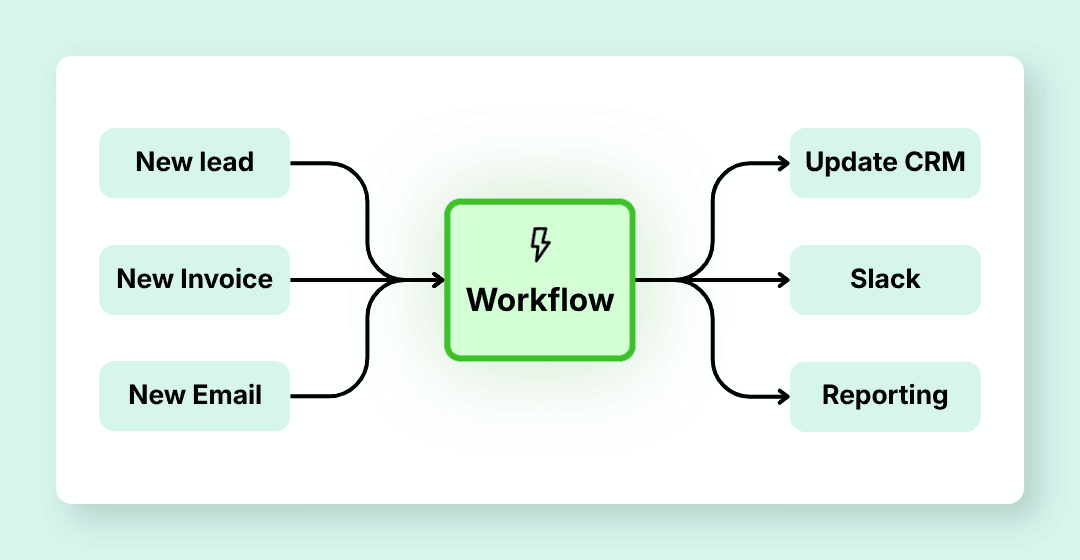
Your tools already know a lot. I connect them so leads, invoices, customers, documents and alerts move from one system to another without copy-paste.

See the n8n service

One event triggers the right action.

Data moves without manual re-entry.

Errors surface in the right place.

Lead receivedData syncedAlert sent
Automated workflow diagram with triggers, processing and actions

Who automates your flows

I turn daily copy-paste into reliable systems.

Good automation does not start with n8n, Make or an API. It starts with one simple question: when something happens, what should happen next without the team thinking about it?

The problem

Your SMB does not need one more tool. It needs the current tools to talk to each other.

The problem often sits between two tools. A signed customer here, an invoice to create there, a forgotten alert, a CSV export that comes back every Monday.

  • A won opportunity in the CRM should become an invoice, a task and a notification
  • An incoming form should create the contact, qualify the request and notify the right person
  • A signed contract should trigger onboarding without depending on someone's memory
  • A received document should be filed, checked and sent to the right tool

These handoffs are perfect for automation: the rule is clear, it mainly needs to run without being forgotten.

Scope

From trigger to the right action.

I connect your existing tools so information moves on its own. The workflow can sync, transform, check, route, notify and sometimes use AI to classify or extract data.

  • A business rule. If this happens, here is what should follow
  • A starting point. Form, email, invoice, schedule, webhook, status change
  • A useful output. Invoice created, CRM updated, alert sent, report generated, document filed

If the request is fuzzy, written in natural language or needs business interpretation, we will look at the Custom AI Agents page instead.

Automated workflow diagram with triggers, processing and actions

SMB scenarios

Workflows that genuinely change the day-to-day.

You do not need a huge digital transformation. We often start with one painful handoff and make it reliable.

Invoicing

01

Make invoicing follow after a sale

A quote is accepted, but the invoice waits because someone has to recreate the customer, check fields and notify the team.

The workflow retrieves the data, creates or finds the customer, prepares the invoice, tracks status and notifies the people involved.

The sale no longer gets stuck in an admin step.

See the Pennylane field note

2026 reform

02

Clean up before e-invoicing

Customers, statuses, fields, approvals: if the data is scattered today, the reform will make it more visible.

The workflow checks useful data, syncs statuses, flags blockers and prepares actions before sending or receiving invoices.

You prepare the invoice flow, not just the platform choice.

Read the 2026 invoicing guide

CRM

03

Avoid duplicate data entry in the CRM

The same customer exists in several tools, statuses diverge and the team no longer knows which information to trust.

The workflow defines the source of truth, syncs useful fields, flags duplicates and keeps a trace of changes.

The CRM becomes a cockpit again instead of a cabinet to clean up.

Read the SMB CRM guide

Sales

04

Give every inbound request a next step

A form arrives during a busy day. Nobody knows yet who should answer or with what priority.

The workflow enriches the lead, checks criteria, routes it to the right person, creates the CRM task and triggers a follow-up if nothing moves.

Every request has an owner and a next action.

Compare with an AI agent

Operations

05

Launch onboarding without missing a step

Contract signed, access to create, documents to send, tasks to assign, follow-ups to plan. One missed step and the experience suffers.

The workflow creates tasks, sends documents, notifies the right people and flags blocked steps.

Onboarding becomes a reliable sequence, not a checklist in someone's head.

See the n8n service

Admin

06

File incoming documents without a treasure hunt

Invoices, receipts, contracts and admin documents arrive by email, Drive or messaging, then everyone files them differently.

The workflow extracts data, applies your rules, files the document, asks for approval if needed and alerts on missing information.

Documents become a controlled flow, not a pile to sort.

Read the Paperasse article

Management

07

Receive reporting without CSV exports

Every week, someone collects numbers from several tools to produce a report everyone waits for.

The workflow pulls KPIs, consolidates them, flags anomalies and sends a summary to leadership or the team.

Human time goes into decisions, not compiling.

See the self-hosted stack
Foundation

A serious technical base, explained simply.

n8n

Workflow orchestration. Can be self-hosted to avoid per-execution limits.

Hetzner + Coolify

European infrastructure for projects hosted by me.

OpenAI / Anthropic

Language models used only when they actually help.

Native connectors

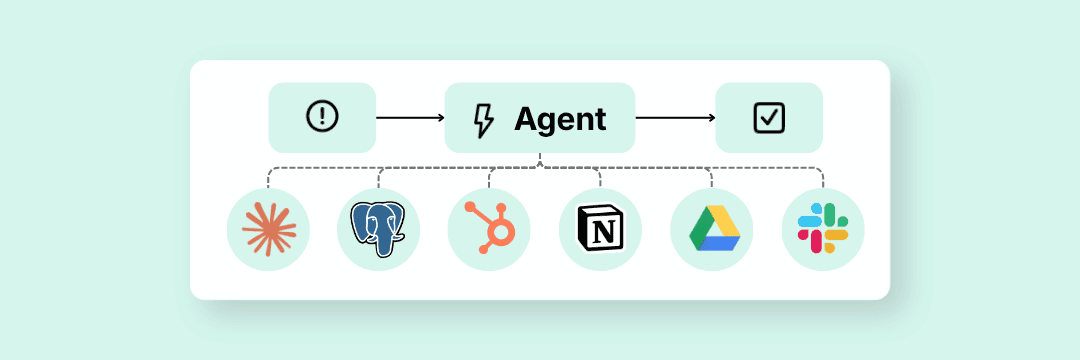
HubSpot, Pipedrive, Gmail, Slack, Notion, Airtable, and any system with a REST API

PostgreSQL / Supabase

Data persistence when the workflow requires it

Need an n8n consultant?

For n8n projects involving APIs, hosting, monitoring and team handover, I have a dedicated page with scope, use cases and method.

See the n8n service

Method

From daily friction to workflow in production

1

Scoping call

Scoping

20 minutes to map the handoff that costs you time.

2

Specifications and quote

Preparation

Functional scope, architecture, hosting model, recurring cost estimate. You validate before any commitment.

3

Technical audit

If needed

If needed: analysis of your systems, API access, data formats, security constraints. We don't build blind.

4

Development and testing

Workflow construction, integrations, testing on your real data. Regular validation checkpoints.

5

Deployment and handover

Go-live, technical documentation, handover session. 30 days of support included.

Deliverables

What you have at the end

1

Operational workflow

Deployed and tested in production, on your infrastructure or mine.

2

Complete documentation

Architecture, triggers, conditions, possible errors, dependencies.

3

Handover session

Your team knows where to look, what to check and when to call me back.

4

30 days of support

Adjustments and support on the delivered scope. Major changes are scoped as a new engagement.

After delivery

You choose how much technical work you want to carry.

Some SMBs want everything in-house. Others just want it to work. Both approaches are possible.

Self-managed

Your infrastructure, your API keys. I deploy, document and train. You manage everything internally.

For organizations with a technical team in place.

Support on demand, no commitment.

Recommended

Hosted

My infrastructure (Hetzner VPS + Coolify), your API keys. Hosting, monitoring and security updates included. I handle the technical side.

For organizations without dedicated infrastructure.

Monthly maintenance included. 3-month commitment.

All-in-one

My infrastructure, my API keys. A single monthly invoice. Only applicable if the workflow integrates AI.

For non-technical SMBs who want a turnkey solution.

API cap defined contractually. Excess billed.

Minimum 3-month commitment for Hosted and All-in-one models.

Scoping

We start from a workflow that already annoys you.

Bring a recurring copy-paste, duplicate entry, lingering invoice, poorly routed lead or painful report. We will see whether automation is the right answer.

The proposal specifies scope, deliverables, hosting model and any maintenance conditions.

Commitments

Clear commitments, no magic.

Specification compliance

If the deliverable does not match the validated scope, I fix it within the agreed scope.

Monitoring and alerts

For systems hosted by me, important errors should surface instead of staying silent.

Two projects maximum

By choice. Every engagement gets my full attention.

No invented promises

I deliver a system on a defined scope. Gains depend on the process, volume and real usage by your team.

FAQ

Your questions

How is this different from Zapier or Make?+
Zapier and Make can be very useful. I often recommend n8n when you want more control, self-hosting, business logic and less dependency on per-execution pricing.
How long does a project take?+
A simple workflow: 1 to 2 weeks. A multi-tool system: 3 to 6 weeks. Initial scoping sets a precise timeline.
I already have workflows in place, can you take over?+
Yes. Migration from Make, Zapier or n8n, custom script optimization. We build from what you have. That's what the technical audit is for.
Which tools are compatible?+
Anything with a REST API, webhook or usable connector. In practice: HubSpot, Pipedrive, Salesforce, Gmail, Slack, Notion, Airtable, Stripe, Pennylane and many others.
Is my data secure?+
Your data flows through secure APIs and is never stored outside your tools. A bilateral NDA is signed before any engagement.
What if I need changes after delivery?+
30 days of support are included. Beyond that, a maintenance contract covers routine adjustments. Scope changes are a new engagement.

Let's talk?

Describe your situation in a few lines, no commitment.